
The game master’s screen that runs the table.
Combat that keeps the books, battle maps you build in minutes, NPCs who talk back, a world to explore and a live screen for every player. On your laptop, your iPad and the TV, all at once, in the game your table plays: fifth edition or Pathfinder, with more games on the way.


Grimwar does a lot. Here it is in nine parts: jump to the one you care about, or search every feature at the bottom.
Six screens, panels you arrange, search, rolls, music and the session log.
Explore → 02Initiative, conditions and fully automated fifth-edition rules, with rolls landing in one tray.
Explore → 03Fog that follows sight, lighting, heights, and spells cast right on the map.
Explore → 04Rooms, walls, paths, scenery and generators. Or drop in a map you have.
Explore → 05A live phone screen: sheet, inventory, map, action bar and alerts.
Explore → 06Notes, the Directory, world maps, connections and roll tables.
Explore → 07NPCs who answer what the party says, plus loot and shops.
Explore → 08Sync fifth-edition characters, level up here, import the books you own.
Explore → 09Fifth edition or Pathfinder (First, Second and remastered Second Edition), picked per campaign, each with its own characters, rules, dice and conditions, kept apart. Fate, Forged in the Dark and Ars Magica are next.
Explore →No more juggling tabs, books and apps mid-fight. Six screens hold what each part of the night needs, and you decide what goes where.
Type what happened, not the formula. Over 110 spells upcast correctly, Shift-click any roll button for advantage, and Pathfinder rolls show their degree of success.
fireball 510d6 fire · DEX save, half on a successsneak attack 74d6 extra damagefall 50 ft5d6 bludgeoningconcentration 22 +5DC 11 · rolled 17, holdsd20+7 vs 18Pathfinder: critical success on 28+Session, Prep, Combat, Map, World and Generators. Drag, resize and add panels; each screen remembers its layout.
Ask about the rules, your campaign or Grimwar itself; answers quote your own records, with the source of every line.
99 ready-made scenes, from taverns to haunted crypts, picked from a ring of themes in the top bar, with your favourites a tap away. Plus 37 sound effects. No setup, no streaming.
Hits, spells, fights and travel are written down as they happen. Every past session is kept, with its full combat logs.
One tap fills an iPad with your panels; cast the map to the TV for the table.
Pictures and sounds load only for your table, and your campaigns can be backed up every week.
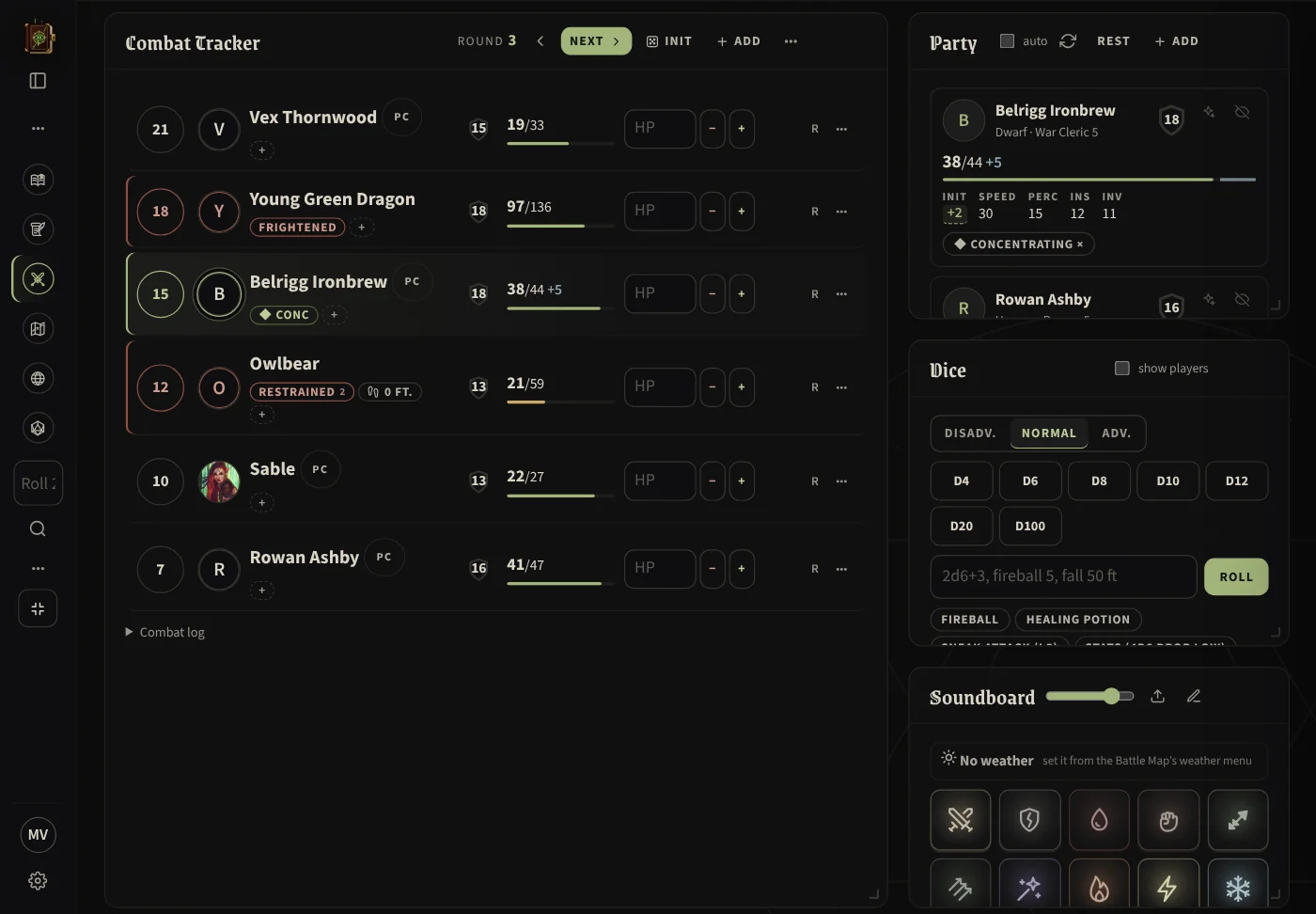
Roll initiative for everyone in one click. Grimwar keeps turns, rounds and conditions straight, fully automated under fifth edition’s 2024 rules and with your own system’s conditions in any other, and the players watch the order live.
Attacks and spells players make from the map land in your To resolve tray with the roll, the target’s AC and the damage already rolled. One tap takes the HP off.
The 2024 rules applied for you: Exhaustion, Hide, Help, Grapple and Shove, Influence and Study, light and darkness, Heavy and Loading weapons, underwater fighting.
See at once if a fight is Low, Moderate or High, or roll a random encounter for where the party stands on the World Map.
A progress bar that brings in reinforcements, changes the rules for a fight, ties lives together or turns creatures to the party’s side.
Sneak Attack, Wild Magic surges, Arcane Ward, Battle Master maneuvers, weapon masteries, Rage and many more, applied for you.
Pick the beast: its stat block, AC and temporary HP take over, and it changes back when they run out.
Ctrl+Z on the map, Reset encounter to put a fight back to its start, and homebrew rules for your table.
Each character sees only what they could see, spell areas land right where they’re cast, and everyone moves their own token.
Players right-click any creature or spot (press and hold on a tablet) and see everything their character can do from there.
Bright day, dusk, moonlit night, dark dungeon or eerie green, with soft pools of light round fires and glowing spells.
Ledges, towers and floating rocks: fliers rise over them, climbers cling to walls, and Fireballs reach up but never down.
Stack a building’s storeys; one tap on the stairs moves the party up and shows players the new floor.
Square, hex rows, hex columns or no grid at all; moving and measuring count the right way.
Pressure plates that stop a token in its tracks, doors only you can see until someone finds them.
Rain, fog, blizzards and sandstorms that cut sight and slow movement; tap to flash a spot on every screen; drag a ruler in 5-foot squares.
Draw rooms, paint roads and rivers, scatter a forest and furnish a tavern, all drawn in one inked style. Or start from a map you already have.
Upload a battle map picture, a video map or a VTT map file. The grid finds itself, and walls take a few clicks.
Dungeon, crypt, castle, manor, temple, sewers, ruins, caves, mines, forest, swamp, coast, village, desert and more: rooms you can change afterwards.
Trees, rocks, ruins, furniture and magic drawn in one inked style, plus hand-drawn art packs and your own uploads.
Trees grow in groves, rocks gather at cliffs and mushrooms by logs. Paint along a line for fences and hedgerows.
Pick what a room is for (bedroom, armory, tavern, library, crypt…), click inside it, and it’s laid out for you.
Pick several things to copy, turn, mirror or resize; make your own layers to hide, lock or keep from players.
Save a map as a picture or a VTT file with its walls, doors and lights, or print it at 1 inch a square.
Prop up an iPad as your screen, cast the map to the TV, and let players follow along on their phones. Every screen updates the moment you act.
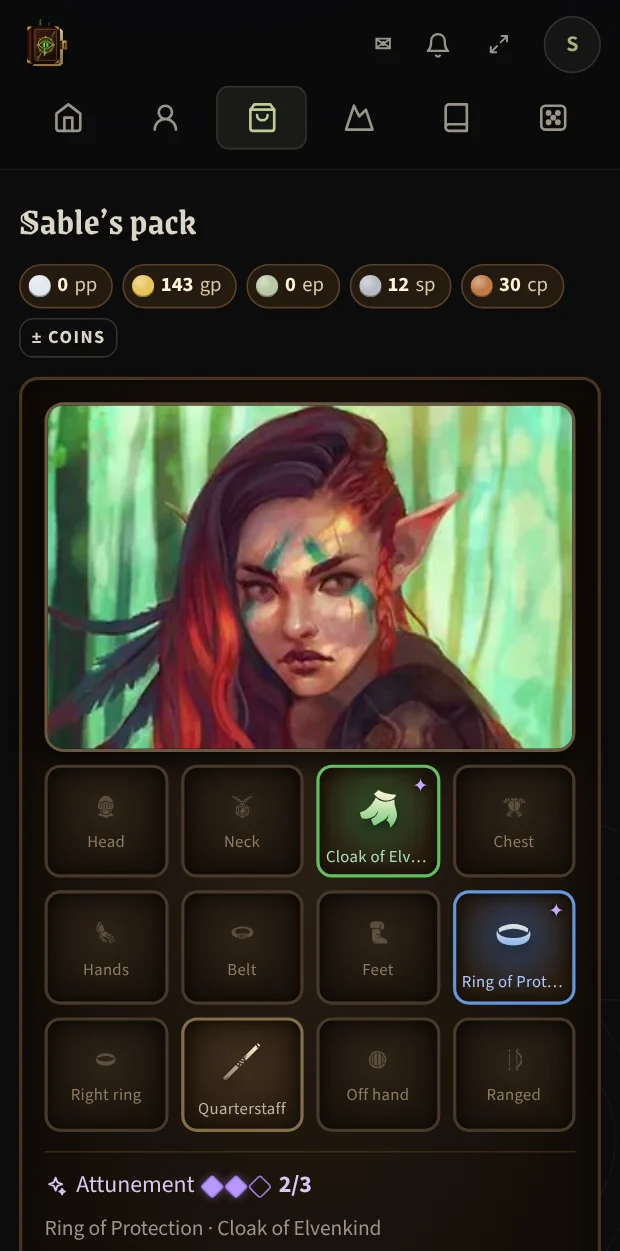
Phones buzz and chime when a turn comes up. Initiative, concentration and death saves pop up as a die to tap.
Message one player privately or slip them a picture only they see. Players can whisper back and roll in secret.
Play your scene on players’ phones or the table TV, for the players who switch it on.
Players make the items you hand out that aren’t in any book yet: kind, rarity, attunement and what it does.
Players keep their own notes and tick off checklists, and can save the recap, handouts and shop items to them.
Browse a merchant’s shelves you’ve shown them, every item with its icon and rarity colour.
Open Invite players and share the code or the link.
Create an account with it and land straight in your campaign.
Choose your character once. Grimwar remembers it on every device.
Notes, people, places and maps that know about each other, and show players only what they’ve found out.
Markdown notes with checklists, read-aloud boxes, and a recap for your players in one click.
NPCs, places, items and factions that link together, for any system, plus the fifth-edition SRD 5.2 built in.
Reveal an entry to the party or to some characters only, and write passages only one character can read.
Write or import your own tables; rows can roll dice or roll on another table. Type “roll tavern rumors”.
Pick each campaign’s game system and edition. In fifth edition, entries are marked 2024, 2014 or Other.
Copy notes, directory, maps, shops and party into a fresh campaign for another table.
Give an NPC a mood, a goal and things they know. Questions, threats, bribes and kindness each land differently, and secrets have to be earned.
A ready-to-play NPC in one click, with a life of their own: family, history, friends and rivals, and what’s on their mind today. The innkeeper knows everyone; hardly anyone knows the fence.
Roll up a shop for any town and size, show its shelves to players, and record who bought what for how much.
Roll treasure and hand it out; coins and items land on the characters’ sheets and stay through resyncs.
Give any item counters and powers, like a blade that keeps the souls it takes, shown to its player above the map.
Roll fights by place, difficulty and creature type for where the party is on the World Map.
Dialogue, generators and rolls are worked out by Grimwar’s own code. Nothing is sent to an AI service.
Sync fifth-edition characters from D&D Beyond or build them here, add characters for any system by hand, and import the adventures you own.
Pull in your party or a whole campaign. HP, AC, spells, items and conditions stay in step, every minute if you like.
Synced characters level up here: new levels, subclasses, feats, Epic Boons and spells, with past choices kept.
Build fifth-edition characters from scratch with 2024 classes, and 2014 or homebrew options marked where your campaign allows them.
Stop syncing a character and keep the sheet as it is; Compare shows what a resync changed.
Books you own on D&D Beyond, or a PDF: creatures with stat blocks, NPCs, places, items and art, ready to review.
Your homebrew collection comes in, and loosely written stat blocks become real attacks, Multiattack and healing.
Grimwar isn’t tied to one game. Each campaign picks its system and edition, and its characters, rules, items and dice follow it. One game’s rules never leak into another’s. Maps, the world, notes, NPCs, music and every player screen work the same in all of them.
Fate, Forged in the Dark and Ars Magica, one at a time as each one plays a full session. Their character importers are already built.
Strike, 2nd attack+14 becomes +9 (agile: +10)Frightened 2−2 to every check and DC, −1 each turnProneOff-guard: −2 AC, −2 to attack0 HP, wounded 1Dying 2 · recovery check DC 12d20+12 vs 22Success · 32 or more is a criticalSlowed 1Two actions this turnRun a fifth-edition table on Monday and a Pathfinder game on Friday; each campaign keeps its own system and edition.
Pathbuilder builds by ID or export, and Foundry VTT actors. A sheet from another game is turned away.
Strikes with the multiple attack penalty, saves, skills and Lores with their ranks, spell slots, focus and hero points.
Frightened, sickened, clumsy, off-guard and the rest change the numbers, and only the worst penalty of a kind applies.
Three actions and a reaction, quickened, slowed and stunned, frightened wearing off, persistent damage and recovery checks.
Items, spells, creatures and books belong to their game. Other editions of the same game show only when you allow it.
Connect your D&D Beyond account once, and Grimwar brings in your players’ characters and the books you own. About ten minutes, start to finish.
Open dndbeyond.com in Chrome, Edge, Firefox or Safari and sign in with the account that owns your books (and, ideally, your campaign). You need a computer for this step: tablets and phones can’t show cookies.
Press F12 (Windows) or ⌘ ⌥ I (Mac). In Safari, first turn on Settings → Advanced → Show features for web developers. Then go to Application (Chrome, Edge) or Storage (Firefox, Safari).
CobaltSession cookieUnder Cookies → https://www.dndbeyond.com, find the row named CobaltSession. Double-click its Value and copy it. It’s long; make sure you get all of it.
On your DM screen, open ⚙ Settings. In the D&D Beyond section, paste the value, press Save, then Test. Status changes to Connected.
Good to know: the cookie is saved to your Grimwar account only and is only ever sent to D&D Beyond. Treat it like a password. It expires every few weeks; when an import says the session expired, copy a fresh one and paste it again.
Status: Connected
Signed in as Keith
On the DM screen, the Party panel lists your characters. Don’t see it? Press + Panel at the top and add Party. Then press + Add in its corner.
On From D&D Beyond, paste each character’s link (like dndbeyond.com/characters/12345678), one per line, and press Add. Characters set to Public always work; private ones work if your account can see them.
Run your game in a D&D Beyond campaign? Use Whole D&D Beyond campaign and paste the campaign’s link: every active character comes in at once. (This one needs the connection from step 1.)
Press ↻ to re-sync, or tick auto to sync every minute: level-ups, HP, slots and conditions follow along. Then open the campaign menu ⋯ → Invite players and share the code; each player signs up with it and picks their character.
No D&D Beyond? The Manual tab adds a character by hand: name, class, HP, AC and the rest.
No characters yet.
Add characters to roll initiative for the party.
Imports every active character in a D&D Beyond campaign.
Press + Panel at the top of the DM screen and choose Adventure Import.
Under Or import a book you own on D&D Beyond, press Show books on D&D Beyond and pick one, or paste the book’s link (it starts with dndbeyond.com/sources/).
It goes chapter by chapter and finds creatures with full stat blocks, NPCs, locations, magic items, encounters and artwork. A big book takes a few minutes; you can keep using the screen meanwhile.
Untick anything you don’t want, fix a type or a picture, and press Add to campaign. Everything lands in your Directory, and the creatures are ready for the combat tracker.
Next to Show books, Import my homebrew collection brings in everything in your D&D Beyond homebrew collection: creatures, magic items, feats, species and subclasses.
Only books your account owns can be read (shared content from a campaign doesn’t count). Have a PDF instead? Drop it on the same panel: Grimwar reads PDFs too.
Reading Chapter 3: The Savage Frontier
You can keep using the rest of the screen while this runs.
The whole list in one place. Type a word (“fog”, “attune”, “roof”) or pick a part of Grimwar.
Grimwar is open to invited tables. Got a code from your DM? Create your account and take your seat.
Sign in or create an account Try Lite